Cloud ASR Speech-to-Text Compared: Deepgram, OpenAI, AssemblyAI, Google Cloud, and Azure
Choosing a speech-to-text service is no longer just about turning audio into words. Cloud ASR providers differ in language coverage, speaker recognition, timestamps, subtitle support, processing speed, pricing, and data policies.
Choosing a speech-to-text service is no longer just about turning audio into words. Cloud ASR providers differ in language coverage, speaker recognition, timestamps, subtitle support, processing speed, pricing, and data policies. The best choice depends on the type of recordings you work with and what you need to do after transcription.
This series introduces five widely used Cloud ASR services: Deepgram, OpenAI Speech-to-Text, AssemblyAI, Google Cloud Speech-to-Text, and Azure AI Speech. Each article explains the provider’s strengths, API workflow, pricing considerations, and common limitations. The series also presents Scribis as a desktop workspace for organizing recordings, reviewing transcripts, editing text, and exporting subtitles or notes.
What is Cloud ASR?
ASR stands for Automatic Speech Recognition. A Cloud ASR service sends an audio recording to a remote speech model, processes the audio on the provider’s servers, and returns a transcript. Compared with running a local model, this approach can reduce installation and hardware requirements while making it easier to access features such as punctuation, timestamps, speaker labels, and language detection.
The trade-off is that audio leaves your computer and is processed by a third party. Accuracy and price matter, but so do connectivity, retention, geographic processing, account security, and the provider’s data-use policy.
Quick comparison
| Provider | Main strength | English support | Speaker recognition | Public base-rate reference | Best for |
|---|---|---|---|---|---|
| Deepgram Nova-3 | Fast transcription, multilingual coverage, and subtitle-friendly output | Yes | Available for compatible Nova workflows | About US$0.258/hour for monolingual pre-recorded audio | Developers, captions, meetings, and real-time use |
| OpenAI Speech-to-Text | Straightforward API and familiar model ecosystem | Yes | Dedicated diarization model available | About US$0.18/hour for the lower-cost model | Simple API workflows and general transcription |
| AssemblyAI | Transcript intelligence, speakers, entities, and content analysis | Yes | Available | About US$0.15/hour for Universal-2 | Content workflows and transcript analysis |
| Google Cloud STT | GCP projects, IAM, regions, and enterprise controls | Yes | Depends on model and locale | About US$0.016/minute for V2 Standard | GCP teams and enterprise deployments |
| Azure AI Speech | Microsoft ecosystem, resource governance, and enterprise deployment | Yes | Depends on API, model, and locale | Depends on region and feature | Azure and Microsoft environments |
The prices above are public base-rate references rather than complete quotes. Billing can vary by model, region, channel count, add-ons, minimum units, volume, and account plan.
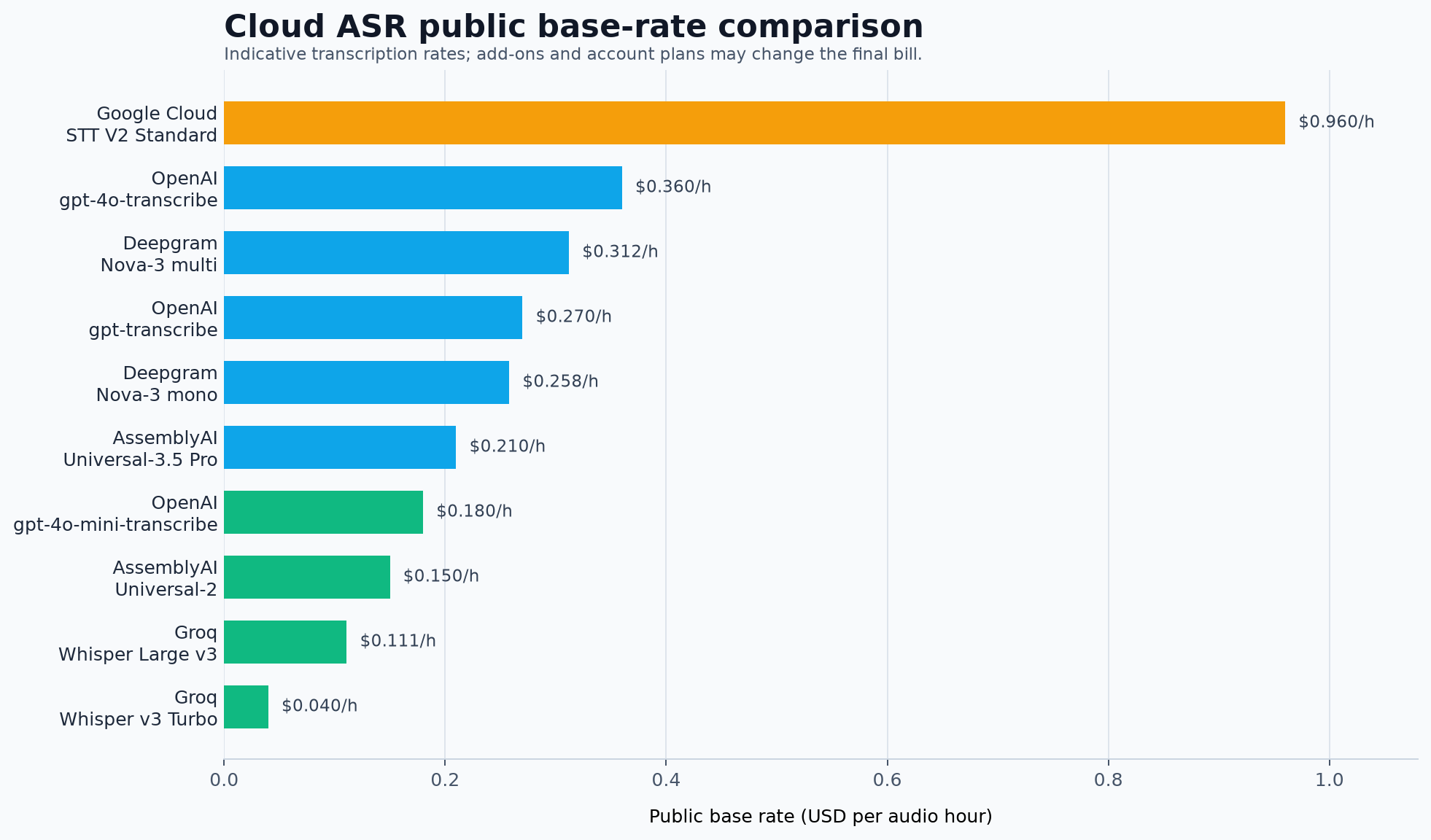
The chart is useful for building a first comparison, but it is not a quality ranking. A fair evaluation uses the same English recordings across all providers and checks names, accents, background noise, overlapping speakers, timestamps, and subtitle alignment.
A practical Cloud ASR workflow
A typical workflow starts with a local recording, continues through a provider’s transcription API, and ends with transcript review and export in a desktop tool.

Scribis fits naturally into the review stage. It can help you bring recordings and transcript work into a desktop environment where you can edit text, search content, organize sections, and prepare subtitles or notes. The Cloud ASR account and billing remain managed by the selected provider.
How to choose a provider
If speed, multilingual coverage, and real-time capability are priorities, Deepgram Nova-3 is a strong candidate to test first. If you want a concise API workflow and a familiar model ecosystem, OpenAI Speech-to-Text is a natural starting point. If transcription is only the first step and you also need summaries, chapters, entities, or speaker information, AssemblyAI is worth a closer look.
Google Cloud and Azure AI Speech are particularly attractive for teams that already use GCP or Microsoft Azure. Their strengths are project-level controls, identity management, regions, billing, and enterprise governance. Those capabilities can be valuable, although initial setup usually requires more cloud configuration than a simple API-key service.
The five articles in this series
Deepgram Nova-3: Fast Transcription, Multilingual Audio, and Speaker Labels
Learn about Nova-3, English and multilingual recordings, Speaker Diarization, Keyterm Prompting, and the pre-recorded transcription API.
OpenAI Speech-to-Text: A Simple API for Transcription and Diarization
Compare gpt-transcribe, gpt-4o-transcribe, and gpt-4o-transcribe-diarize, including file limits, language hints, and timestamps.
AssemblyAI: From Transcripts to Speaker Labels and Content Understanding
Explore Universal models, speaker labels, entities, chapters, summaries, and add-on pricing.
Google Cloud Speech-to-Text: Enterprise Transcription with GCP
Understand V2 models, Dynamic Batch, authentication, project setup, regions, and enterprise cost controls.
Azure AI Speech: Enterprise Speech Recognition for Microsoft Environments
Learn about Speech resources, en-US, short-audio REST requests, long recordings, and Azure governance.
Why use a desktop workspace such as Scribis?
Cloud providers are excellent at processing audio, but transcript work often continues after the API response arrives. You may need to correct names, remove filler words, search for a quote, split a recording into sections, align text with video, or export subtitles.
Scribis is designed for that desktop part of the workflow. Rather than moving repeatedly between a media player, a text editor, and separate transcript files, you can use a focused workspace for reviewing and organizing spoken content. It complements Cloud ASR instead of replacing the provider’s speech model or account system.
Privacy and API-key hygiene
Sending audio to a Cloud ASR service means that the provider processes the recording. Before uploading interviews, customer calls, internal meetings, or other sensitive material, review the provider’s retention, data-use, region, and enterprise options.
API keys should be treated as passwords. Use a dedicated key for each project, apply expiry dates or usage limits where available, store keys in a password manager, and revoke any key that appears in a public repository or screenshot.
Conclusion
There is no single Cloud ASR provider that is best for every recording. Deepgram is a strong candidate for speed and subtitle-oriented workflows; OpenAI is easy to approach through a clear API; AssemblyAI is attractive when transcript intelligence matters; Google Cloud and Azure are compelling for teams that need enterprise cloud governance.
After choosing a provider, a desktop workspace such as Scribis can make the rest of the process easier: reviewing, editing, searching, organizing, and exporting transcripts. Start with the provider that matches your recordings, test it with representative audio, and use the same quality and cost checklist across every candidate.
References
- Deepgram Pricing
- OpenAI API Pricing
- AssemblyAI Pricing
- Google Cloud Speech-to-Text pricing
- Deepgram Models & Languages Overview
- Deepgram Speaker Diarization
- OpenAI File transcription
- OpenAI API Pricing
- AssemblyAI Supported Languages
- AssemblyAI Speaker Labels
- Google Cloud Speech-to-Text V2 supported languages
- Google Cloud Speech-to-Text pricing
- Azure Speech language and voice support
- Azure Speech-to-text REST API for short audio