OpenAI Speech-to-Text: A Simple Cloud Transcription Workflow for English Audio
OpenAI Speech-to-Text is a practical Cloud ASR option for users who want a clear API, familiar model naming, and a straightforward path from an audio file to a transcript.
OpenAI Speech-to-Text is a practical Cloud ASR option for users who want a clear API, familiar model naming, and a straightforward path from an audio file to a transcript. It supports English recordings, multilingual audio, language hints, context prompts, and a dedicated diarization model for speaker labels.
This article explains the available models, file limits, speaker recognition, timestamps, pricing, and API testing. It also shows how a desktop workspace such as Scribis can fit into the review stage after transcription. The OpenAI account, API key, and billing remain managed through OpenAI.
Which model should you choose?
OpenAI’s current speech-to-text documentation presents gpt-transcribe as a general starting point for audio transcription. gpt-4o-transcribe-diarize is designed for speaker-aware transcripts, while gpt-4o-mini-transcribe is useful when lower cost matters for large volumes.
| Model | Best for | Public price reference |
|---|---|---|
gpt-transcribe |
General recordings and multilingual audio | About US$0.0045/minute |
gpt-4o-mini-transcribe |
High-volume, cost-sensitive workflows | About US$0.003/minute |
gpt-4o-transcribe |
Higher-quality general transcription | About US$0.006/minute |
gpt-4o-transcribe-diarize |
Speaker-aware interviews and meetings | About US$0.006/minute |
whisper-1 |
Legacy Whisper-compatible workflows and some timestamp use cases | About US$0.006/minute |
The prices above are estimates published on OpenAI’s pricing page. Actual billing can change with model updates, account terms, and additional API usage.
Why use OpenAI for speech-to-text?
The file transcription workflow is easy to understand: send an audio file to /v1/audio/transcriptions, select a model, and read the response. OpenAI’s documentation includes curl and SDK examples, which makes the service approachable for developers building a small script or a larger content workflow.
For English audio, you can use an English language hint such as en. If you know the recording’s language, providing a hint can reduce ambiguity. For multilingual recordings, test the language configuration with real samples that include accents, names, abbreviations, and language switching.
Create an OpenAI API key
Open the OpenAI API Platform, sign in, and create a key dedicated to transcription. A useful name might be:
English-Transcription
Store the key in a password manager or environment variable. Never publish a real key in a blog post, GitHub repository, screen recording, or screenshot. ChatGPT subscriptions and API billing are separate products, so check the API Platform billing status before testing.
export OPENAI_API_KEY='YOUR_OPENAI_API_KEY'
Test a basic English transcription
The file transcription endpoint is:
https://api.openai.com/v1/audio/transcriptions
A basic English request looks like this:
curl 'https://api.openai.com/v1/audio/transcriptions' \
  -H "Authorization: Bearer ${OPENAI_API_KEY}" \
  -F '[email protected]' \
  -F 'model=gpt-transcribe'
Replace sample.m4a with the path to your own recording. OpenAI’s file transcription API currently has a 25 MB single-file limit and supports common formats including mp3, mp4, mpeg, mpga, m4a, wav, and webm.
Speaker diarization for interviews and meetings
When you only need a transcript, use a general transcription model. When you need to distinguish speakers, test:
gpt-4o-transcribe-diarize
The diarization model returns speaker-aware segments with fields such as speaker, start, and end. For audio longer than 30 seconds, the official documentation recommends chunking_strategy="auto" or an appropriate VAD configuration.
curl 'https://api.openai.com/v1/audio/transcriptions' \
  -H "Authorization: Bearer ${OPENAI_API_KEY}" \
  -F '[email protected]' \
  -F 'model=gpt-4o-transcribe-diarize' \
  -F 'response_format=diarized_json' \
  -F 'chunking_strategy=auto'
Diarization is an estimate of who spoke when. Overlapping speech, similar voices, short replies, and background noise can still produce incorrect speaker boundaries, so review important conversations before publishing or archiving them.
Prompts, keywords, and names
The transcription API supports context settings such as prompt, keywords, and languages. These can help with product names, people, technical terms, or mixed-language recordings. Keywords are hints rather than guaranteed output; adding unrelated terms can reduce quality or introduce words that were not spoken.
A conceptual Python example is:
from openai import OpenAI

client = OpenAI()

with open("interview.wav", "rb") as audio_file:
    transcript = client.audio.transcriptions.create(
        model="gpt-transcribe",
        file=audio_file,
        prompt="An English product interview about Cloud ASR and transcript editing.",
        extra_body={
            "keywords": ["Scribis", "Cloud ASR", "Speech-to-Text"],
            "languages": ["en"],
        },
    )

print(transcript.text)
Use the current API documentation when implementing these optional fields because request shapes can change between models and API versions.
Timestamps and subtitles
A transcript can be accurate and still be difficult to use for captions if its timestamps are missing or poorly aligned. OpenAI’s documentation describes verbose_json and timestamp_granularities[] for supported models, including the whisper-1 workflow.
Before producing subtitles, test a short clip and verify that segment or word timestamps line up with the video. Then check speaker changes, pauses, and cuts. A desktop tool such as Scribis can be useful for reviewing and organizing transcript text after the API has produced the initial result.

Pricing reference
OpenAI’s estimated transcription rates translate to approximately US$0.18 per audio hour for gpt-4o-mini-transcribe, US$0.27 per hour for gpt-transcribe, and US$0.36 per hour for gpt-4o-transcribe or its diarization model.
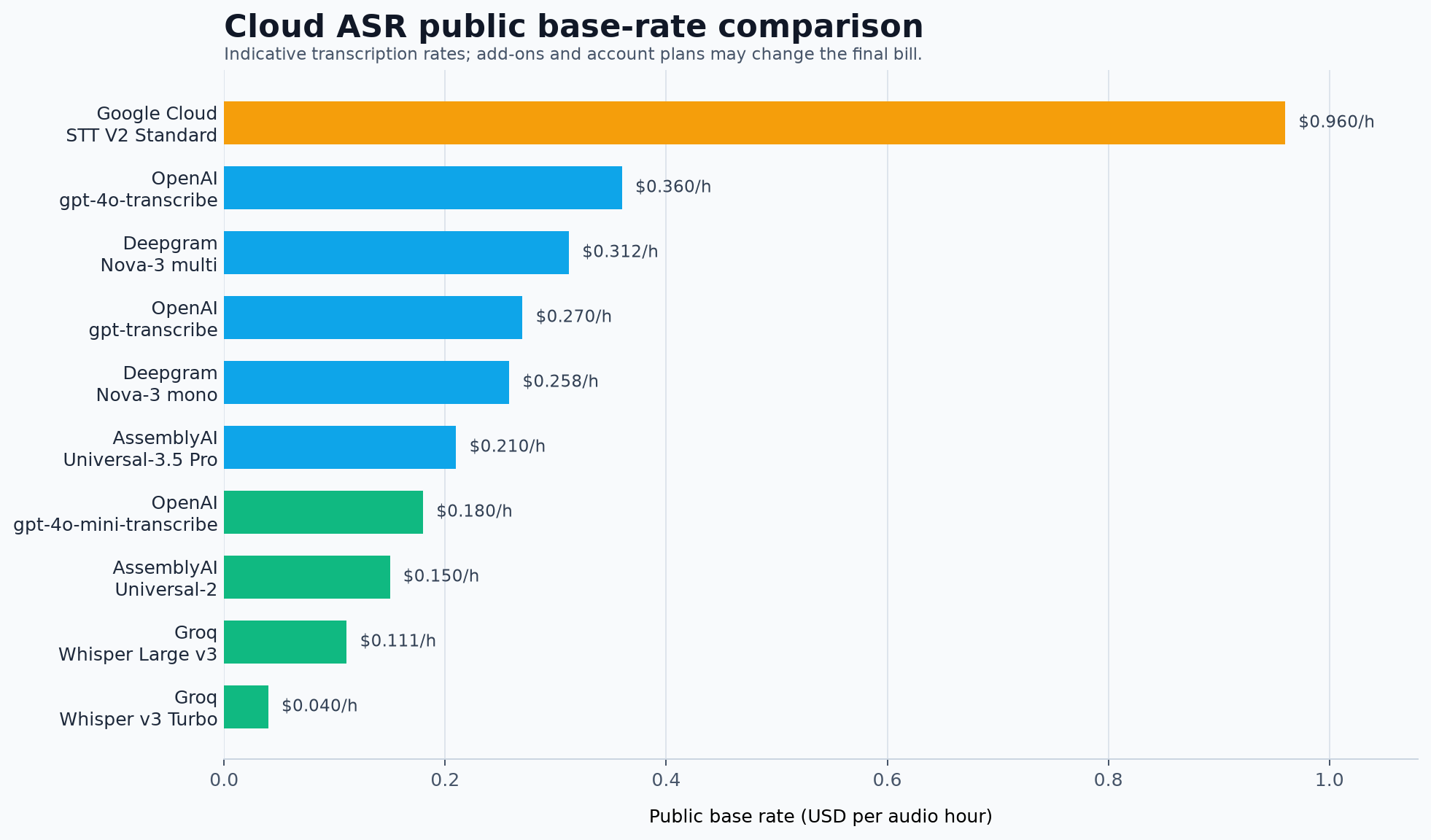
These are reference rates rather than a complete quote. OpenAI billing is separate from Groq, ElevenLabs, AssemblyAI, Google Cloud, Azure, and Scribis.
Organize the result with Scribis
The API is useful for generating a transcript, but the work often continues afterward. You may want to correct names, search for a quote, divide a long recording into sections, compare the transcript with the audio, or prepare subtitles.
Scribis can serve as a desktop workspace for that part of the process. Import your recording, review the spoken content, edit the transcript, organize sections, and export the result as notes or subtitles. This makes it a useful companion for Cloud ASR workflows where transcription and editorial review are separate stages.
Common questions
Can OpenAI transcribe English accents?
Yes, OpenAI models support English audio, but accuracy depends on microphone quality, background noise, vocabulary, speaker overlap, and accent. Test with recordings that resemble your real use case instead of relying only on a clean sample.
Can one file be larger than 25 MB?
The file transcription API currently documents a 25 MB single-file limit. Compress the audio, extract a lower-bitrate audio track, or split a long recording into smaller segments. Review the joins afterward so that sentences are not duplicated or lost.
Will every application show speaker labels?
Not necessarily. A diarization model can return speaker segments, but a downstream application must parse and display speaker, start, and end fields. Always verify the final interface and exported file.
Are OpenAI, Groq, and ElevenLabs credits interchangeable?
No. Their accounts, keys, pricing, quotas, and data policies are managed separately. OpenAI transcription does not consume Groq usage or ElevenLabs credits.
Conclusion
OpenAI Speech-to-Text is a good starting point for English transcription when you want a clear API and several model choices. Begin with gpt-transcribe for general recordings, then test gpt-4o-transcribe-diarize when speaker labels are important.
Once the API returns a transcript, Scribis can provide a focused desktop environment for reviewing, editing, searching, organizing, and exporting spoken content. Together, the two stages form a practical workflow from English audio to a usable transcript.