AssemblyAI Speech-to-Text: From English Transcripts to Content Understanding
A basic speech-to-text API turns a recording into words. AssemblyAI is designed to go further, offering transcript features and Speech Understanding capabilities.
A basic speech-to-text API turns a recording into words. AssemblyAI is designed to go further, offering transcript features and Speech Understanding capabilities such as speaker identification, entities, chapters, summaries, sentiment, and key phrases.
That makes AssemblyAI worth evaluating for interviews, meetings, customer calls, podcasts, and research recordings where transcription is only the first step. This article covers the models, pre-recorded audio workflow, speaker labels, pricing, and common limitations. It also explains how Scribis can fit into the desktop review stage after transcription.
Why consider AssemblyAI?
AssemblyAI’s pre-recorded API generally follows an asynchronous workflow: upload or provide an audio URL, create a transcript job, wait for completion, and retrieve the result. This is a natural fit for recorded meetings, interviews, lectures, and podcasts.
The official language documentation lists Mandarin support for Universal-3.5 Pro and broader language coverage for Universal-2. English recordings are also supported, but accuracy should be tested with the accents, terminology, microphone quality, and background conditions found in your own work.
| Feature | Typical use |
|---|---|
| Pre-recorded transcription | Interviews, meetings, lectures, and podcasts |
| Speaker identification | Labels for different speakers |
| Keyterm prompting | Names, products, brands, and technical vocabulary |
| Entity detection | People, organizations, locations, and dates |
| Custom formatting | Consistent output style |
| Translation | Converting transcripts into other languages |
| Summaries and chapters | Optional content-understanding workflows, depending on the current model and policy |
Universal-3.5 Pro and Universal-2
Universal-3.5 Pro is suited to users who want a newer pre-recorded model and the currently documented language coverage. Universal-2 offers broad language support and remains a useful baseline for comparison. Features and add-on pricing vary by model, so choose based on the output you actually need.
A practical benchmark is to process the same English interview with both models and compare names, punctuation, interruptions, speaker changes, and long pauses. A clean studio clip is not enough to judge a real meeting workflow.
Create an AssemblyAI API key
Open the AssemblyAI Dashboard, sign in, and create a key for transcription. Store it in a password manager or an environment variable. Never publish a real API key in a blog post, GitHub repository, screen recording, or screenshot.
export ASSEMBLYAI_API_KEY='YOUR_ASSEMBLYAI_API_KEY'
AssemblyAI’s public pricing page currently lists a new-account free credit offer and pre-recorded reference prices of about US$0.15 per hour for Universal-2 and US$0.21 per hour for Universal-3.5 Pro. Speaker, translation, entity, and other Speech Understanding features may be billed separately.
Upload and transcribe a recording
A common pre-recorded workflow starts by uploading a local file:
curl --request POST \
  --url 'https://api.assemblyai.com/v2/upload' \
  --header "authorization: ${ASSEMBLYAI_API_KEY}" \
  --header 'content-type: application/octet-stream' \
  --data-binary @sample.m4a
Use the returned audio URL to create a transcript job:
curl --request POST \
  --url 'https://api.assemblyai.com/v2/transcript' \
  --header "authorization: ${ASSEMBLYAI_API_KEY}" \
  --header 'content-type: application/json' \
  --data '{
    "audio_url": "https://cdn.assemblyai.com/upload/your-file-id",
    "speech_models": ["universal-3-5-pro"],
    "language_code": "en",
    "speaker_labels": true
  }'
The API parameters and model IDs can change as the service evolves. Use the current AssemblyAI documentation when implementing a production workflow. The important concept is the asynchronous process: submit the audio, monitor the transcript job, and retrieve the completed result.
Speaker labels and multi-channel audio
Speaker labels are useful for interviews, panels, meetings, and customer calls. They can turn a long block of dialogue into an easier-to-review transcript with speaker segments. Diarization is still an estimate, however; overlapping speech, similar voices, short answers, and background noise can produce boundaries that need manual correction.
Multi-channel audio can also affect cost. AssemblyAI’s pricing information explains that multi-channel audio is charged by channel; a one-hour, two-channel file may count as two billable audio hours. If separate channels are not required, mixing the recording to mono before upload can reduce unnecessary usage.
Chapters, summaries, and entities
AssemblyAI is particularly interesting when the transcript needs to become a more useful document. A long interview can be processed into topic sections, a summary, key phrases, or an entity list. These features are not necessarily available for every model or account, and the provider’s documentation may deprecate or change individual workflows over time. Check the current documentation and plan before enabling them.
| Feature | Possible output | Practical note |
|---|---|---|
| Speaker Identification | Speaker A, Speaker B, and similar labels | Review overlapping speech |
| Entity Detection | People, organizations, locations, dates | Depends on model and plan |
| Auto Chapters | Topic-based sections | Check current model policy |
| Summarization | Summary and key points | Check current model policy |
| Translation | Translated transcript | May be an add-on |
Pricing reference
Based on the current public reference rates, 60 minutes of audio costs approximately US$0.15 with Universal-2 or US$0.21 with Universal-3.5 Pro before optional features. Speaker identification, entity detection, translation, summaries, chapters, and multi-channel processing can change the total.
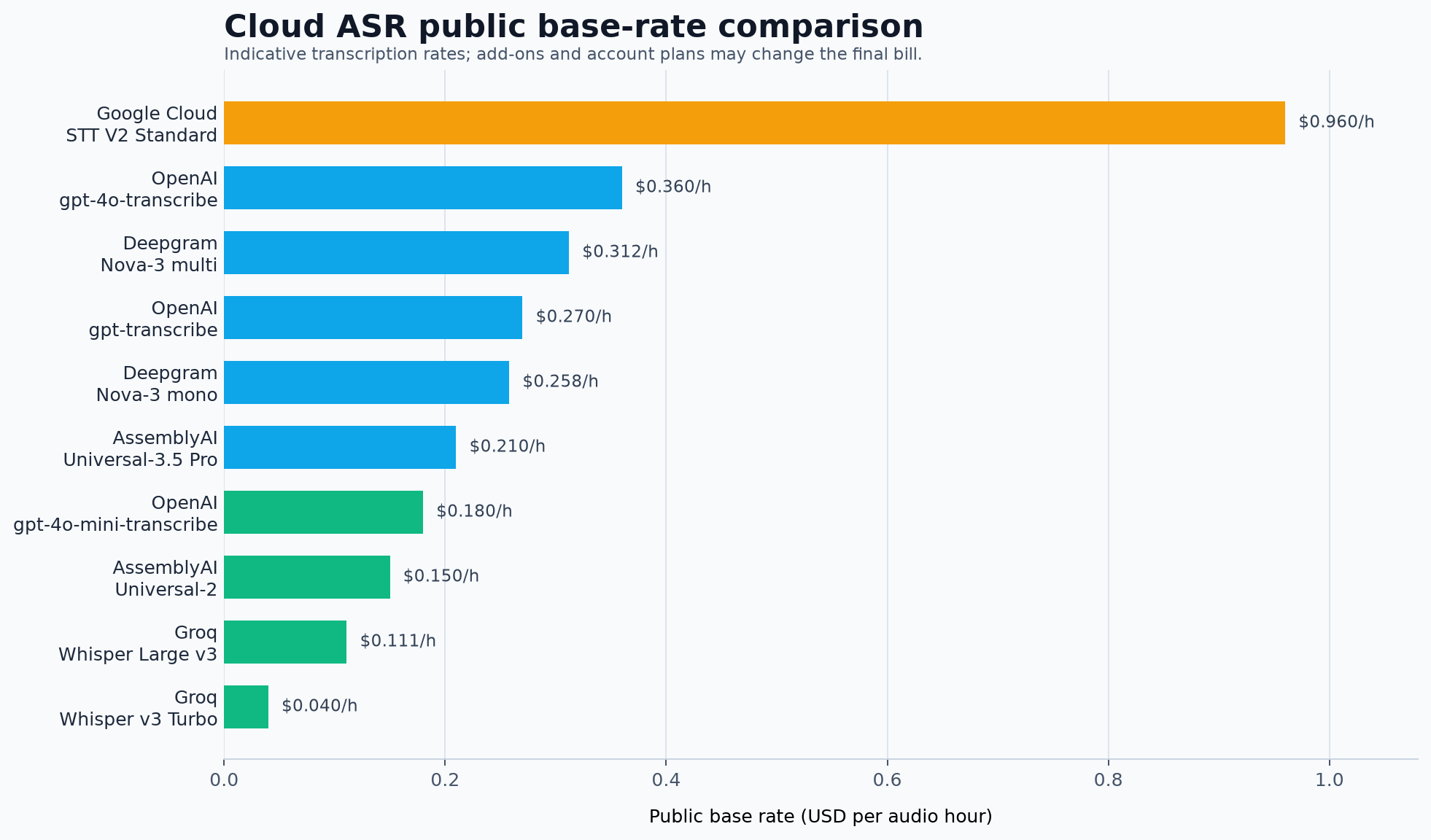
AssemblyAI billing is separate from OpenAI, Groq, ElevenLabs, Google Cloud, Azure, and Scribis. Each service manages its own account, key, quota, and data policy.
Use Scribis for transcript review
Transcription is often only the beginning. After the API produces a result, you may need to correct names, search for a quote, divide the recording into sections, compare text with audio, or prepare subtitles.
Scribis can provide a focused desktop workspace for that editorial stage. Import recordings, review the text, organize sections, search for key moments, and export a usable transcript or subtitle file. This is especially helpful when the Cloud ASR provider and the desktop editing workflow are separate parts of the same project.

Common questions
Does AssemblyAI support English recordings?
Yes, English is supported, but results depend on accents, microphone quality, background noise, vocabulary, and overlapping speakers. Test with recordings that reflect your actual use case.
Why are speaker labels not perfect?
Speaker identification estimates who spoke when. Overlapping speech, background noise, short turns, and similar voices can cause incorrect boundaries. Review important conversations before publishing or archiving them.
Why is the final cost higher than the base transcription price?
Speaker, entity, translation, chapters, summaries, and other Speech Understanding features may be add-ons. Multi-channel audio can also be charged by channel.
Does AssemblyAI provide real-time transcription?
AssemblyAI offers both pre-recorded and streaming products. This article focuses on the recorded-file workflow because it is the most common starting point for desktop transcript work.
Conclusion
AssemblyAI is a strong candidate when a transcript needs to become more than plain text. Its combination of pre-recorded transcription, speaker labels, entities, and content-understanding workflows can be valuable for English interviews, meetings, podcasts, and research material.
Start with a representative recording, compare Universal models, and enable advanced features only when you have confirmed their value and current pricing. Once the transcript is ready, Scribis can provide a practical desktop environment for reviewing, editing, organizing, and exporting spoken content.