Google Cloud Speech-to-Text: Enterprise Transcription for English Audio
Google Cloud Speech-to-Text is a strong option for teams that already use Google Cloud Platform. It provides multiple recognition models, regional configuration, project-level access control, and broad language coverage.
Google Cloud Speech-to-Text is a strong option for teams that already use Google Cloud Platform. It provides multiple recognition models, regional configuration, project-level access control, and broad language coverage. Its enterprise value comes from fitting into an existing GCP environment with IAM, Cloud Storage, logging, and cost management.
This article covers English transcription, Speech-to-Text V2, Dynamic Batch, authentication, pricing, and practical limitations. It also explains how Scribis can fit into the desktop stage of the workflow after a transcript has been produced. Google Cloud and Scribis are separate products with separate accounts and billing.
Who should consider Google Cloud STT?
Google Cloud Speech-to-Text is a good fit for organizations that need GCP project management, IAM permissions, regional controls, or large-scale batch processing. For a personal first experiment, a simpler API-key provider may be easier; for an established Google Cloud team, Speech-to-Text can fit naturally into existing infrastructure.
| Category | Google Cloud Speech-to-Text V2 |
|---|---|
| English | Multiple English locales and model options |
| Main models | Chirp and other models, depending on region and language |
| Speaker recognition | Depends on model and language support |
| V2 Standard | About US$0.016 per minute from the public base tier |
| Dynamic Batch | About US$0.003 per minute from the public base tier |
| Authentication | GCP project, service account, or other Google Cloud credentials |
| Best for | GCP teams, enterprise controls, and large workloads |
Google Cloud’s public pricing page charges by successfully processed audio duration. The public V2 Standard and Dynamic Batch rates above are reference values; region, model, channel count, and other features can affect the final bill.
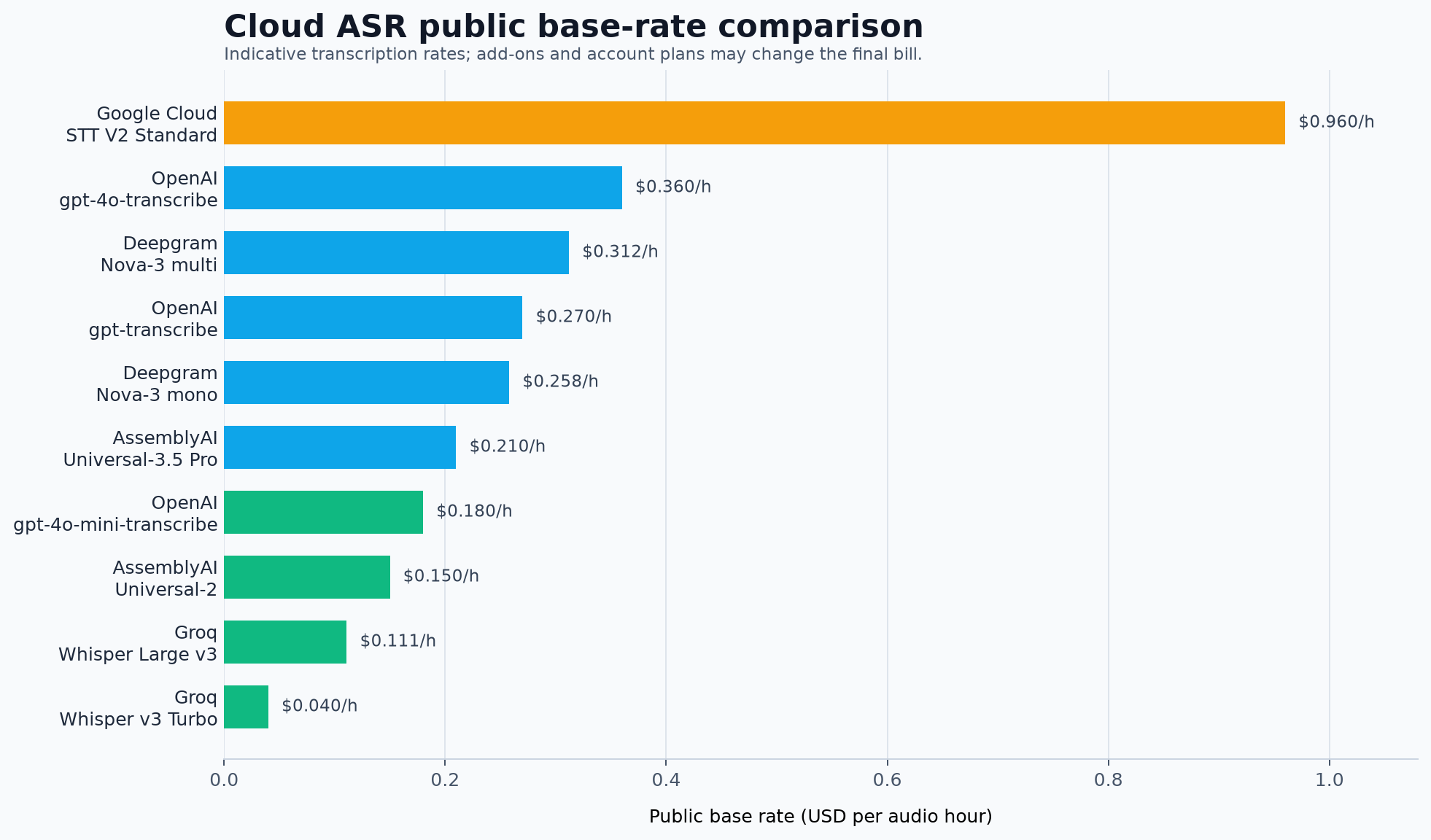
The chart shows the V2 Standard reference rate. Dynamic Batch is a different processing mode with a lower urgency level and should not be treated as the same service at a different price.
English language and model selection
Google Cloud uses locale identifiers such as en-US, en-GB, and en-AU. Select the locale that best matches the recording and the expected English variety, then compare results with real samples that include accents, names, abbreviations, and background noise.
A clean studio recording is not enough for evaluation. Include phone audio, meeting-room audio, multiple speakers, interruptions, and domain-specific vocabulary. Check punctuation, number formatting, proper names, and timestamp alignment.
Create a Google Cloud project
Open the Google Cloud Console and create a project dedicated to speech transcription, for example:
speech-transcription-project
Enable the Cloud Speech-to-Text API and make sure billing is configured. Google Cloud may offer trial credits to eligible new customers, but eligibility, duration, and available services should be checked in your own console.
A separate project makes it easier to track Speech-to-Text usage. For a team, create a dedicated service account with only the permissions required for speech recognition instead of using a highly privileged personal account.
Authentication and credential security
Google Cloud commonly uses a service account or Application Default Credentials. A downloaded service-account JSON file can contain a private key, so never upload it to GitHub, a public drive, a blog post, or a screen recording.
For local testing, you can configure Application Default Credentials with the Google Cloud CLI:
gcloud auth application-default login
gcloud config set project speech-transcription-project
If you use a service-account file, point the environment variable to a secure local path:
export GOOGLE_APPLICATION_CREDENTIALS="$HOME/.config/gcloud/speech-service-account.json"
Successful authentication does not automatically mean that the Speech-to-Text API is enabled or that the account has the correct permissions. Confirm the API, billing, region, model, and IAM settings before processing a large recording.
Standard recognition and Dynamic Batch
For recorded lectures, interviews, podcasts, and meetings, Google Cloud offers different recognition paths. Dynamic Batch can reduce the base rate when the work does not need to be processed urgently. It is a useful option for overnight or large-volume workloads.
For live captions or low-latency applications, choose a processing mode that matches the response-time requirement. The lowest per-minute number is not always the best choice if the workflow depends on immediate results.
Speaker recognition, timestamps, and captions
Google Cloud’s language and model tables list feature compatibility by language, model, and region. A language being supported does not automatically mean that every combination of speaker recognition, automatic punctuation, model adaptation, and word time offsets is available.
If your goal is subtitles, verify the response fields that contain word or segment time offsets, then test the exported SRT or VTT file against the video. Speaker metadata also needs to be preserved by whatever tool you use for transcript review.
Use Scribis for transcript review
Scribis can be used as a desktop workspace for the editorial part of the process: import audio or video, review transcript text, search for key moments, organize sections, and prepare subtitles or notes.
After Google Cloud produces a transcript, Scribis can help turn the raw result into something easier to read and use. This division keeps the cloud provider responsible for speech recognition while the desktop workspace handles review and organization.

Cost and multi-channel audio
Google Cloud charges by successfully processed audio duration, and multi-channel audio can be counted separately by channel. A one-hour, four-channel recording may therefore represent four hours of billable audio.
If the recording is stored in Google Cloud Storage, other cloud-resource charges may also apply. Use Cloud Billing budgets and alerts for test projects so that experiments do not create an unexpected bill.
Common questions
Can I use one simple API key?
Google Cloud’s standard enterprise authentication usually involves a project, credentials, IAM permissions, and sometimes a region or recognizer. Some Google APIs support API keys, but do not assume that a key alone replaces the credentials required by every Speech-to-Text V2 workflow. Follow the current authentication documentation for your chosen method.
What is the difference between en-US and another English locale?
The locale tells the model which English variety to expect. Choose the locale that best matches the recording, then validate it with accents, vocabulary, and proper names from your actual use case.
Is Dynamic Batch always better?
No. Dynamic Batch can be attractive for non-urgent processing, but it is not the right choice for every latency requirement. Compare turnaround time and total cost, not only the per-minute rate.
Are Google Cloud and Scribis the same service?
No. Google Cloud Speech-to-Text is a cloud speech recognition API, while Scribis is a desktop workspace for working with recordings and transcripts. They can occupy different stages of the same workflow.
Conclusion
Google Cloud Speech-to-Text is a compelling choice for English transcription when your team already works in GCP or needs project-level controls, IAM, regional configuration, and enterprise cost management. Its flexibility comes with more setup than a simple API-key provider.
Start with an English locale such as en-US, compare Standard and Dynamic Batch for your workload, and test timestamps and speaker features with representative audio. Once the transcript is ready, Scribis can provide a focused desktop environment for reviewing, editing, organizing, and exporting spoken content.