Azure AI Speech: Enterprise Speech Recognition for English Workflows
Azure AI Speech is a strong Cloud ASR option for organizations already using Microsoft Azure, Microsoft Entra ID, or other Microsoft enterprise services.
Azure AI Speech is a strong Cloud ASR option for organizations already using Microsoft Azure, Microsoft Entra ID, or other Microsoft enterprise services. It provides real-time, fast, and batch transcription paths, broad language support, and integration with Azure resources, regions, access control, and cost management.
This article introduces Azure Speech for English recordings, explains the difference between short-audio and long-audio workflows, and covers resource setup, authentication, pricing, and practical limitations. It also shows how Scribis can fit into the desktop stage after transcription, where recordings and transcript text can be reviewed, edited, organized, and exported.
Who should consider Azure AI Speech?
Azure AI Speech is a natural fit for internal meetings, customer-service recordings, Microsoft 365-related workflows, and organizations that need Azure governance. For a personal first experiment, a simpler API-key provider may be easier; Azure becomes more compelling when your team already has subscriptions, resource groups, identity management, and cost controls in place.
Azure’s language-support documentation lists English locales such as en-US, en-GB, and en-AU. Feature availability can vary by locale and processing mode, so check the official table before enabling fast transcription, batch transcription, custom speech, post-stream refinement, or speaker-related features.
| Category | Azure AI Speech |
|---|---|
| English locales | en-US, en-GB, en-AU, and others depending on the feature |
| Main modes | Real-time, fast, batch, and post-stream refinement, depending on availability |
| Authentication | Speech resource key, bearer token, or Microsoft Entra ID |
| Long recordings | Speech SDK, Fast Transcription, or Batch Transcription |
| Best for | Azure and Microsoft enterprise environments |
| Pricing | Varies by region, tier, model, and feature |
Azure pricing cannot be represented accurately by one universal per-minute number. Check the Azure Speech pricing page together with the region and pricing tier of your Speech resource.
English locale selection
Azure Speech uses BCP-47 locale identifiers. Common English choices include:
en-US
en-GB
en-AU
Choose the locale that best matches the recording and expected vocabulary. A United States business meeting, a UK interview, and an Australian podcast may benefit from different evaluation settings. Test names, idioms, numbers, abbreviations, and regional pronunciation with recordings from the real workflow.
Do not assume that every feature available for one English locale is available for another. Azure’s language-support table separates real-time, fast, batch, and other feature columns, so check the selected locale and feature combination before planning production use.
Create an Azure Speech resource
Open the Azure Portal and create a Speech resource. During setup, choose the subscription, resource group, region, and pricing tier. A dedicated resource makes it easier to review usage, set a budget, rotate keys, and separate transcription costs from other Azure services.
After creation, open Keys and Endpoint to view the resource key and service endpoint. Treat the key as a password. Store it in a password manager, secret manager, or protected environment variable instead of placing it in a public repository, blog post, screenshot, or screen recording.
Organizations using Microsoft Entra ID can use token-based authentication instead of placing a long-lived subscription key in an application configuration. That approach requires appropriate role assignments and token management, so it is usually best handled by an Azure administrator.
Test a short recording with REST
Azure’s Speech-to-text REST API for short audio is intended for short recordings when the Speech SDK or another transcription path is not being used. Microsoft’s documentation states that the directly submitted audio must not exceed 60 seconds; the endpoint returns a final result rather than partial results and does not support batch transcription or custom speech.
A common input format is 16 kHz, mono WAV PCM or OGG OPUS. The request must specify a language such as en-US, and authentication can use Ocp-Apim-Subscription-Key or a bearer token.
export AZURE_SPEECH_KEY='YOUR_SPEECH_RESOURCE_KEY'

curl --request POST \
  --url 'https://YOUR_RESOURCE_NAME.cognitiveservices.azure.com/stt/speech/recognition/conversation/cognitiveservices/v1?language=en-US&format=detailed' \
  --header 'Accept: application/json' \
  --header 'Content-Type: audio/wav; codecs=audio/pcm; samplerate=16000' \
  --header "Ocp-Apim-Subscription-Key: ${AZURE_SPEECH_KEY}" \
  --data-binary '@sample.wav'
Replace the resource name, key, and file path with your own values. This endpoint is useful for a quick English smoke test, not for a one-hour meeting.
Long recordings and batch workflows
For classes, interviews, podcasts, or long meetings, use the Azure Speech SDK, Fast Transcription, or Batch Transcription rather than the short-audio REST endpoint. Long-running workflows may use a file URL, Azure Storage, or another supported input method, then wait for the transcription job to complete.
The right choice depends on latency. Real-time transcription is intended for immediate results, while batch workflows are better suited to recorded files that can wait. A production workflow should also decide how to handle retries, job status, failed files, result downloads, timestamps, and speaker metadata.
Speaker features, timestamps, and captions
Azure’s feature support changes by API, locale, model, and processing mode. The fact that en-US is supported does not automatically mean that every combination of speaker recognition, automatic punctuation, custom speech, and post-stream refinement is available.
If your goal is captions, verify that the response contains usable word or segment offsets and test an exported SRT or VTT file against the video. For meetings, also check how speaker metadata is represented and whether your transcript editor preserves it.
Use Scribis for transcript review
Cloud ASR is excellent at processing speech, but the editorial work often continues afterward. You may need to correct names, search for a quote, divide a recording into sections, compare text with the audio, or prepare subtitles.
Scribis can serve as a focused desktop workspace for that review stage. Import recordings, review the transcript, edit the text, organize sections, and export the result as notes or subtitles. This creates a practical division between cloud speech recognition and desktop transcript work.

Pricing and security
Azure Speech pricing depends on the processing mode, region, pricing tier, model, and optional features. The official pricing page lists different categories for Speech-to-Text, Custom Speech, and add-ons, so a single number should not be used as a universal Azure quote.
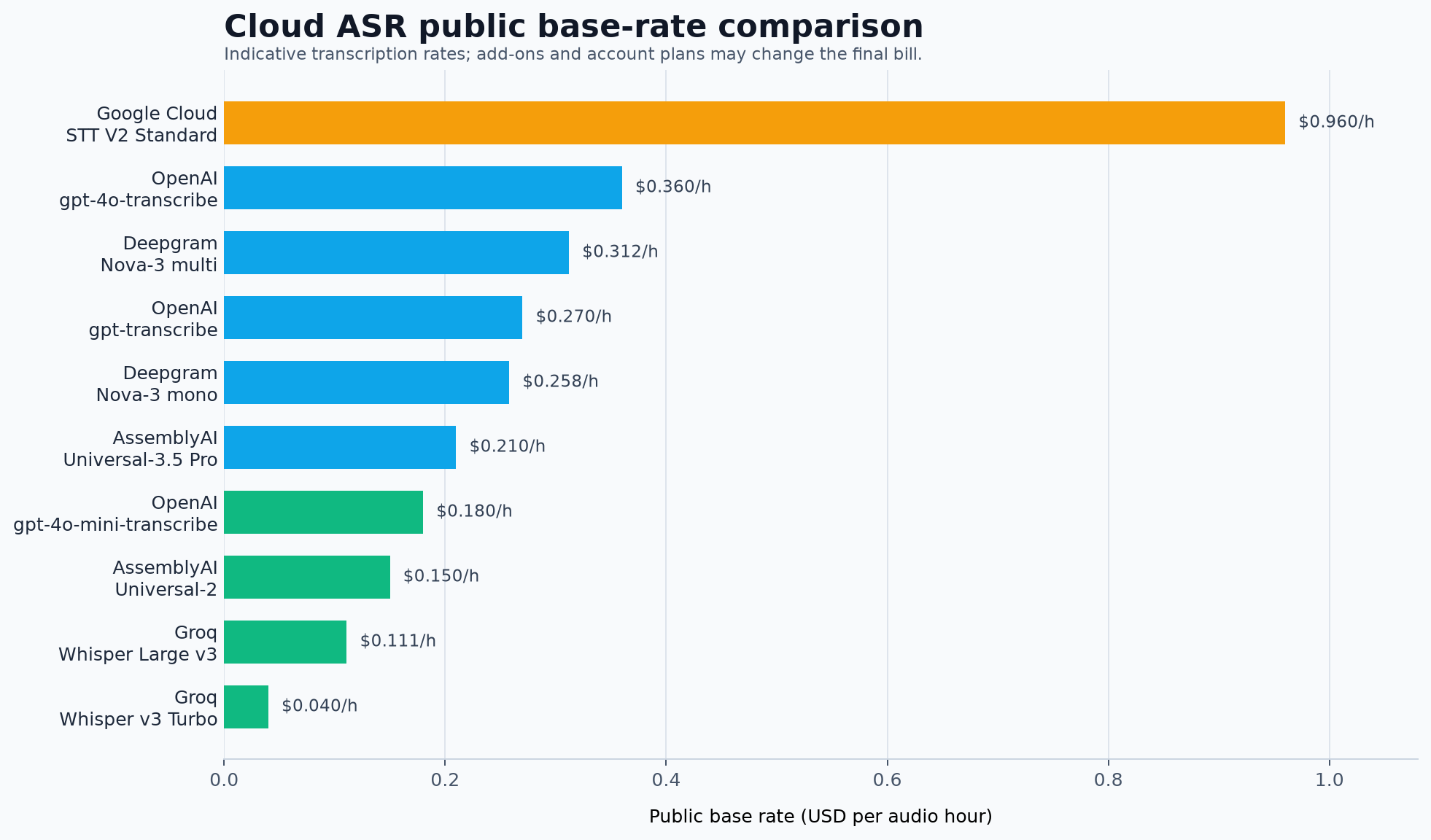
The chart compares providers with clearer public base-rate references and does not include Azure because Azure pricing requires a resource, region, tier, and feature context. Use Azure Cost Management budgets and alerts for production and test subscriptions.
Common questions
Can I use Azure with only an API key?
A Speech resource is still required. The key belongs to that resource, and the request commonly also needs an endpoint or region. Create the resource first, then follow the authentication method required by the chosen API.
Why does a one-minute file fail with the short-audio endpoint?
The documented limit is no more than 60 seconds. A file slightly longer than 60 seconds, or an unsupported audio format, can be rejected. For longer recordings, use the Speech SDK, Fast Transcription, or Batch Transcription.
Should I use en-US for every English recording?
Not necessarily. Choose the locale that best matches the speakers and expected English variety, then test names, accents, vocabulary, and regional pronunciation with representative audio.
Is Azure AI Speech a zero-retention service?
Do not assume that any Cloud ASR provider is automatically zero-retention. Review the current Azure data-processing, privacy, and enterprise terms for the resource and service configuration you plan to use.
Conclusion
Azure AI Speech is an enterprise-oriented Cloud ASR choice for English workflows, especially when your organization already uses Azure and Microsoft identity services. It supports multiple English locales and transcription modes, but its resource, region, authentication, and long-audio configuration require more planning than a simple upload API.
Start with a short en-US test, then compare the Speech SDK, Fast Transcription, and Batch Transcription paths for your latency and file-length requirements. Once the transcript is ready, Scribis can provide a practical desktop environment for reviewing, editing, organizing, and exporting spoken content.