Deepgram Nova-3 Speech-to-Text: Fast English Transcription and Speaker Recognition
If you are looking for a Cloud ASR service that combines speed, multilingual coverage, and support for multi-speaker recordings, Deepgram Nova-3 is a strong candidate to evaluate.
If you are looking for a Cloud ASR service that combines speed, multilingual coverage, and support for multi-speaker recordings, Deepgram Nova-3 is a strong candidate to evaluate. Deepgram positions Nova-3 as a high-performance general-purpose speech recognition model for both pre-recorded audio and real-time streaming, with features such as Smart Formatting, Keyterm Prompting, Entity Detection, and Speaker Diarization.
This article explains where Deepgram fits, how to test its API, how to handle English and multilingual recordings, and how Scribis can fit into the desktop transcript workflow. Scribis is presented here as a tool for reviewing and organizing recordings; the Cloud ASR account, API key, and billing remain managed through Deepgram.
Why consider Deepgram Nova-3?
Deepgram is designed for workflows where a transcript is more than a block of plain text. Punctuation, paragraphs, word-level timestamps, confidence scores, and speaker metadata can all affect the quality of meeting notes and captions.
Nova-3 supports English and a wide range of multilingual use cases. If a recording is primarily English, start with an English language setting. If it includes Spanish, French, German, or other languages, compare the appropriate multilingual model and language configuration using representative recordings.
| Feature | Typical use |
|---|---|
| Pre-recorded transcription | Interviews, lectures, meetings, podcasts, and videos |
| Real-time streaming | Live captions and voice applications |
| Smart Formatting | More readable punctuation, dates, numbers, and text formatting |
| Speaker Diarization | Labels such as Speaker 0 and Speaker 1 |
| Keyterm Prompting | Names, brands, products, and technical vocabulary |
| Word timestamps | Subtitle alignment and searchable transcripts |
English and multilingual recordings
For a clearly English recording, use an English language setting such as:
language=en-US
If the recording contains multiple languages, test a multilingual model rather than assuming that an English-only configuration will handle every language equally well. Pay attention to names, acronyms, product terms, code words, and moments where speakers switch languages.
A useful benchmark contains more than clean studio audio. Include a meeting with interruptions, a phone recording, different accents, background noise, and at least one section with overlapping speech. These examples reveal more than a short, perfectly recorded sentence.
Speaker Diarization for meetings and interviews
Deepgram Speaker Diarization adds speaker numbers and timing metadata to the transcription result. For pre-recorded audio, the current documentation recommends diarize_model=latest for the latest production diarizer.
Diarization is useful for interviews, panels, meetings, and customer calls, but it is not a guarantee that every speaker boundary will be correct. Overlapping speech, similar voices, short responses, and background noise can still require manual review.
Deepgram’s documentation also notes that diarization is compatible with Nova batch models but not with Deepgram Whisper models. If speaker labels matter, choose a compatible Nova model and verify the returned speaker, start, and end values.
Test Deepgram with the official API
Create a key in the Deepgram Console, then store it in a password manager or environment variable. Never publish a real API key in a blog post, GitHub repository, screen recording, or screenshot.
export DEEPGRAM_API_KEY='YOUR_DEEPGRAM_API_KEY'
Basic English transcription
curl --request POST \
  --header "Authorization: Token ${DEEPGRAM_API_KEY}" \
  --header 'Content-Type: audio/m4a' \
  --data-binary @sample.m4a \
  --url 'https://api.deepgram.com/v1/listen?model=nova-3&language=en-US&punctuate=true&smart_format=true'
Add speaker labels and utterances
curl --request POST \
  --header "Authorization: Token ${DEEPGRAM_API_KEY}" \
  --header 'Content-Type: audio/m4a' \
  --data-binary @meeting.m4a \
  --url 'https://api.deepgram.com/v1/listen?model=nova-3&language=en-US&punctuate=true&smart_format=true&utterances=true&diarize_model=latest'
Replace the file path and content type with the actual recording. For example, WAV commonly uses audio/wav, while MP3 commonly uses audio/mpeg.
Keyterm Prompting
Keyterm Prompting is useful when a recording contains names, product names, medical terms, or technical vocabulary that a general model might misrecognize. It should be treated as a hint rather than a command to insert words that were never spoken.
In a real evaluation, compare the transcript with and without keyterms. Check whether the desired terms improve without causing unrelated words to appear. Deepgram lists Keyterm Prompting as an optional feature on its pricing page, so review the current pricing and model documentation before deploying it.
Pricing reference
Deepgram’s public pricing page currently lists Nova-3 pre-recorded transcription at approximately US$0.0043 per minute for monolingual usage and US$0.0052 per minute for multilingual usage. Keyterm Prompting, Entity Detection, Redaction, and other features may have separate pricing.
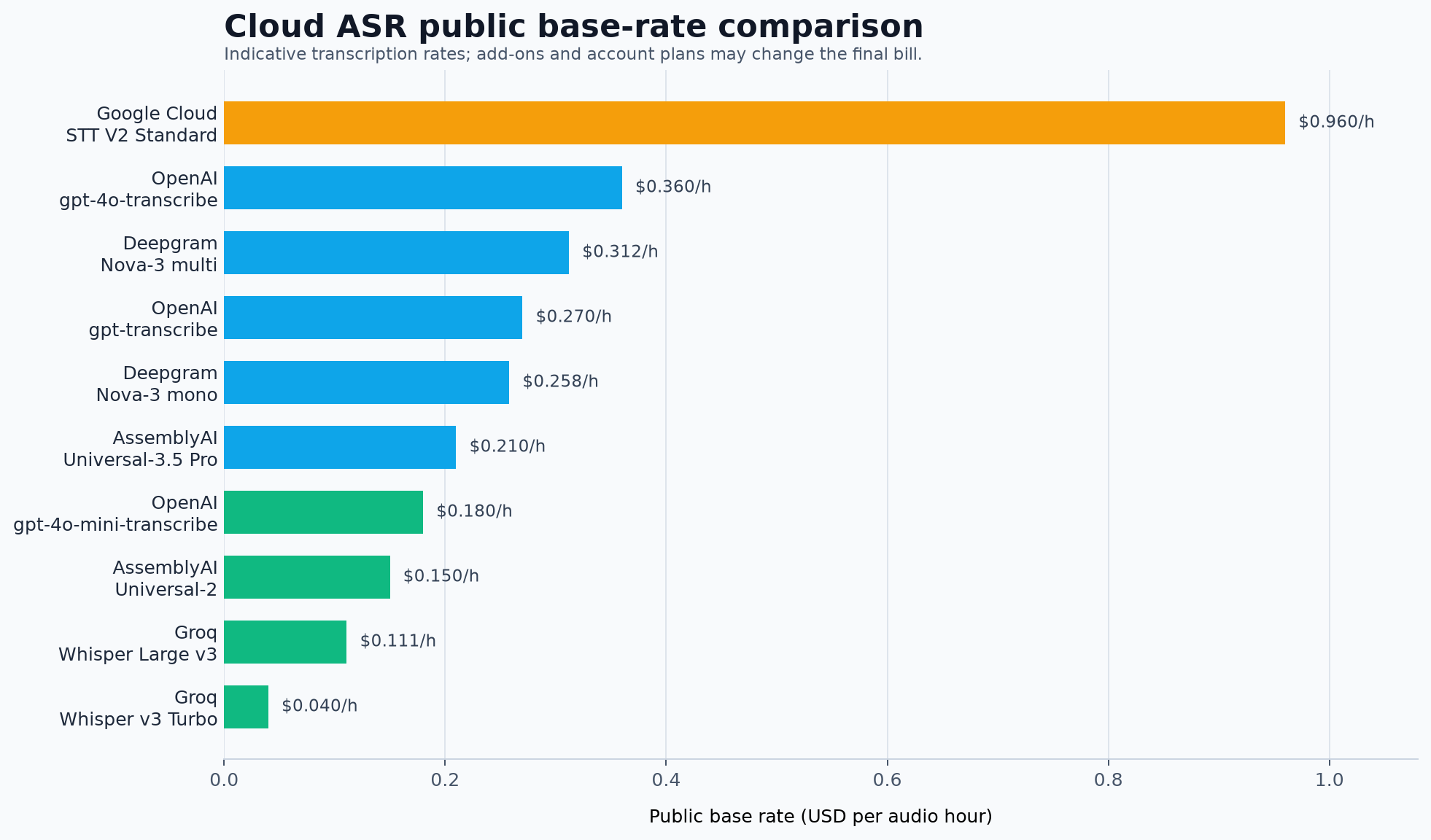
These prices are reference rates, not a complete quote. Region, plan, audio channels, add-ons, and account terms can change the final amount. Deepgram billing is separate from OpenAI, Groq, ElevenLabs, and Scribis.
Using Scribis as the desktop review stage
Cloud ASR services are excellent at processing audio, but the work often continues after the API returns. You may need to correct names, remove filler words, search for a quote, divide a recording into sections, or prepare captions.
Scribis can be used as a desktop workspace for that stage: bring recordings and transcript work into one place, review the text, organize sections, and export the result for notes or subtitles. This makes Scribis a useful companion to Cloud ASR rather than a replacement for the provider’s speech model.

Common questions
Does Deepgram support English accents?
Deepgram supports English recordings, but accuracy still depends on microphone quality, background noise, speaker overlap, vocabulary, and accent. Test with recordings that resemble your real use case instead of relying only on a clean sample.
Why are speaker labels missing?
Confirm that the request uses a compatible Nova batch model and includes diarize_model=latest. Deepgram Whisper does not support diarization, and a downstream desktop tool must also preserve the returned speaker metadata.
Should diarize=true and diarize_model=latest be sent together?
No. Deepgram currently recommends using diarize_model; sending both parameters is unnecessary and may cause the request to be rejected.
Can I use Deepgram for subtitles?
Yes. The combination of punctuation, formatting, utterances, and word timestamps can be useful for caption workflows. Always review timing around speaker changes and overlapping speech before publishing subtitles.
Conclusion
Deepgram Nova-3 is a compelling Cloud ASR candidate for fast English transcription, multilingual audio, meetings, interviews, and caption workflows. Its combination of timestamps, formatting, keyterm prompts, and speaker metadata gives it more range than a basic speech-to-text endpoint.
Start with a simple English request, then compare diarization and multilingual settings against recordings from your own workflow. Once the transcript is available, Scribis can provide a focused desktop environment for reviewing, editing, searching, organizing, and exporting the spoken content.